Set up scheduled tasks
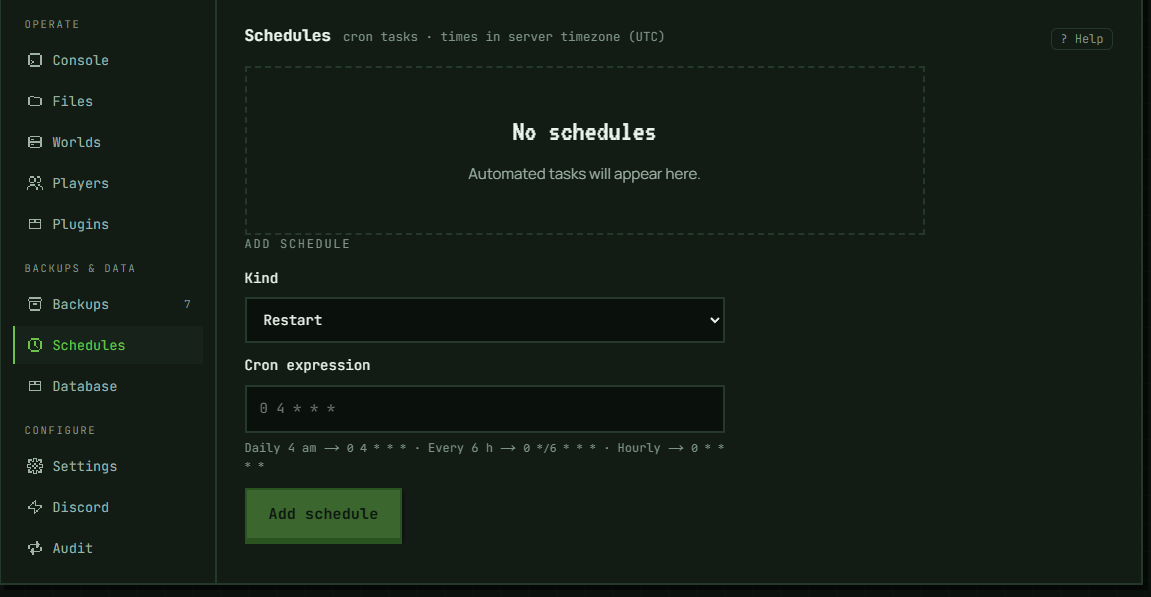
The Schedules tab runs recurring tasks for this server on a cron schedule — restart it, send it an RCON command, or take a backup. Up to 10 schedules per server.
The three kinds of task
- Restart — restarts the server, as the Restart control does.
- Command — sends a raw RCON command, exactly as you'd type it in the console (no leading
/); the command field itself only appears once you select this Kind.stopandrestart(including namespaced forms likeminecraft:stop) are rejected at creation — use the Restart kind or the panel's own Stop/Restart controls for those, since a scheduled RCON stop would bypass the platform's lifecycle handling. Commands are capped at 256 characters. - Backup — takes a backup, the same snapshot mechanism as Back up now on the Backups tab. Like the button, it never runs beside another backup, a restore, a rename or a world change (reset, delete, import, version change) of the same server — a run that finds one going takes no backup and is recorded as "skipped". So is a run while the server is being moved to another node. Unlike the button, it has no "still running in the background" handoff and leaves no audit-log entry.
Restart and Command only run if the server is already running at the moment they're triggered — whether that's the scheduled time or a manual Run now (below) — a sleeping server is never woken to run one, and the attempt is recorded as "skipped" rather than failed. Backup runs whether the server is running or sleeping; it is skipped only for the reasons above.
Writing the cron expression
Schedules use a standard 5-field cron expression: minute, hour, day-of-month, month, day-of-week — a @daily/@hourly-style descriptor is also accepted, though the panel's own hint only shows 5-field examples. The panel shows examples as you type: daily at 4 am is 0 4 * * *, every 6 hours is 0 */6 * * *, hourly is 0 * * * *. Times are evaluated in UTC.
Enabling, disabling, and running now
Each schedule has a toggle: switching it off pauses it (it stops firing, but stays in the list with its history) and switching it back on recomputes its next run time from the cron expression starting from that moment — it does not fire immediately just because you re-enabled it.
Run now runs the task immediately, under the same rules as a normal firing: a Restart or Command task still does nothing but record "skipped" if the server isn't running at that moment, and a Backup task records "skipped" if another backup, restore, rename or world change of the server is going. Either way, the schedule's regular next-run time is unaffected by an out-of-cycle run. The row updates with the result once it's done.
Reading the last-run status
Each schedule shows its last result: ok, skipped, or failed, with a timestamp and, for a failure, the error text. A schedule that's never run shows "Never run".
Deleting a schedule
Delete removes a schedule permanently after a click-through confirmation — this isn't a typed confirmation, just a click. It only affects that one schedule.
Troubleshooting
A restart/command schedule keeps showing "skipped". The server was sleeping (or otherwise not in the running state) when it fired — or when you clicked Run now; the same rule applies to both. Restart and Command schedules never run against a sleeping server, whether triggered on schedule or manually — only a Backup-kind schedule runs on a sleeping server.
A backup schedule shows "skipped". When it fired (or when you clicked Run now), another backup of the server — yours, the daily automatic one or another schedule's — a restore, a rename or a world change was going, or the server was being moved to another node. No backup was taken. The next firing tries again, or click Run now once the other operation has finished.
"Invalid cron expression". The panel collapses any cron-parse failure to this fixed message — it doesn't show you the parser's own detail, no matter what's actually wrong with the expression. Check the field against the 5-field format (minute hour day-of-month month day-of-week) or a @daily/@hourly-style descriptor.
"Could not update schedule". This is the panel's generic fallback for a schedule action that fails for any reason other than an invalid cron expression, and it doesn't distinguish between causes. The Add button itself blocks an empty cron or command before you can click it — but pressing Enter in either field submits the same way without that check, so an empty command can still reach the server that way. Nothing on either submit path checks the following, apart from the empty-command case just described:
- your Command starts with
/— the field's own hint says not to, but nothing stops you from typing it anyway; remove the leading slash and retry (unless what's left isstoporrestart— see the next point) - you entered
stoporrestart(with or without a leading slash or namespace) as a Command — use the Restart kind instead, or the panel's own Stop/Restart controls for a one-off - your Command is longer than 256 characters — shorten it
- you're at the 10-schedules-per-server limit — delete an existing schedule first
Outside of creating, the same message can also appear if enabling/disabling, running now, or deleting a schedule fails for an unrelated reason; retry, and contact support if it persists.
Schedule fired at the wrong time. Cron times here are UTC, not your local timezone or the server's in-game time — convert your intended local time to UTC when writing the expression.
In the panel: Server → Backups & data → Schedules