Back up and restore your server
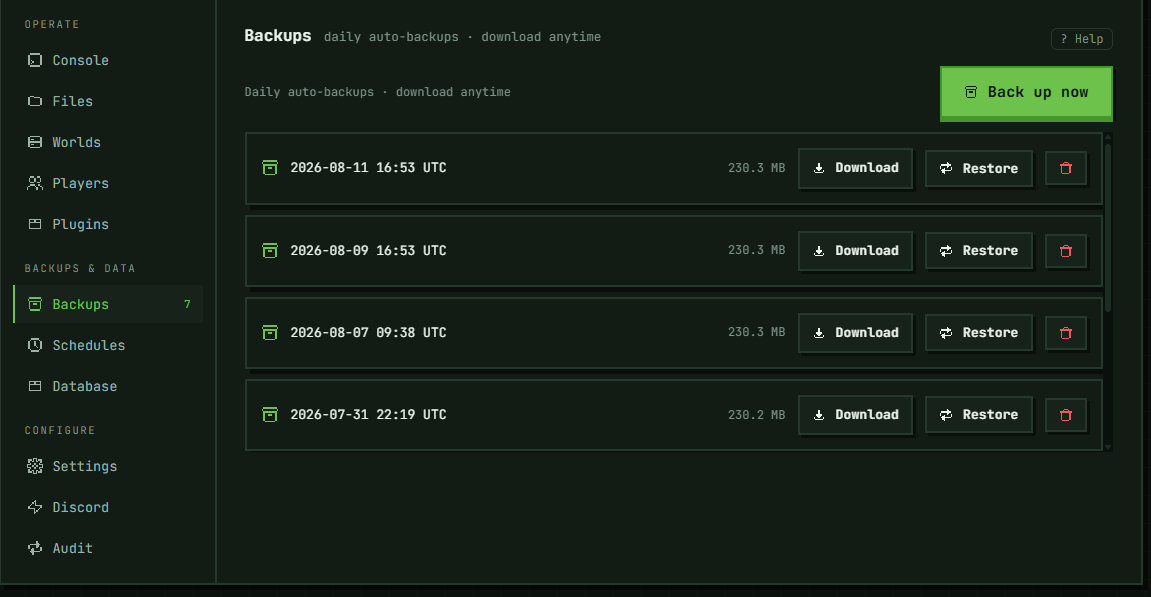
The Backups tab lists every backup taken for this server, newest first, with Back up now above the list; each row also gets Download and Restore — and, for the account's owner, Keep (see Keeping a backup). Automatic backups land here too, alongside anything you trigger yourself.
Each backup is labelled with how it was taken: Daily (the automatic daily backup), Manual (Back up now, or a backup requested through the API), Scheduled (a Backup schedule, on time or with Run now), Before version change (the snapshot taken automatically before the server's core or version is changed), Before restore (the snapshot of the current files a restore takes before it replaces them), Before world reset and Before world deletion (the snapshots a world reset and a world deletion take before they delete a world), Before world import (the snapshot of the current files a world import takes before it replaces them), Before a change (such a snapshot the platform found on the server's disk with no entry in this list — after an interrupted operation — and added back; if the time it was taken isn't known, it's dated when it was found) or Recovered (a backup found the same way — for example after an interrupted backup — and added back). Backups taken before labels were introduced have none. A backup the owner kept is also labelled Kept.
What a backup contains
A backup is an archive of the server's entire /data directory — the world, server.properties and other config files, and installed plugins/mods — not just the world folder. It does not include a managed MySQL database created on the Database tab: that database lives outside /data, in a separate service, so neither a backup nor a restore here touches it. If the server is running when the snapshot is taken, the platform pauses and flushes world saves over RCON first so the archive isn't taken mid-write; if that quiesce step isn't possible (RCON unreachable, or the server isn't running), the snapshot is taken anyway rather than skipped.
Automatic backups
Automatic backups run once a day per server, whether it's running or sleeping: every hour the platform backs up any server whose newest automatic backup is 23½ hours old or older, or that has none yet, so a server's automatic backups land about 24 hours apart. Only automatic backups count toward that clock — one you take with Back up now or one from a schedule doesn't move the next automatic backup. A server that is installing (or whose install failed) or is mid node-move is skipped and checked again an hour later; otherwise nothing needs to be running for its backup to happen. If a server's automatic backup fails, it isn't retried every hour: the next try comes about 1 hour after the first failure, then 2, 4, 8 and 16 hours after each further one, then once a day until one succeeds (a platform restart starts that count over, which can bring a try sooner). Back up now never waits for this. Each kind of backup is kept on its own, so many backups of one kind never push out another: the 7 newest automatic backups, plus one weekly backup — the newest automatic backup of its calendar week (Monday to Sunday, UTC) — for each of the 4 most recent weeks before them that have one; the 3 newest Manual ones; the 7 newest Scheduled ones; and the 3 newest Recovered ones. Before restore, Before version change, Before world reset, Before world deletion, Before world import and Before a change snapshots are kept for 72 hours, whatever else is taken, and then deleted (a found one, from when it was found). Backups from before labels were introduced count as automatic. Older ones are deleted automatically when the server's next backup is taken. A sleeping server keeps getting its daily backup, so after about a week asleep its 7 newest automatic backups are all copies of the state it went to sleep in; the weekly ones reach back about a month, so after four to five weeks asleep they are copies too. To keep one longer, Keep it (see below) or download it. If you need a different cadence or a backup tied to a specific time, add a backup-kind entry on the Schedules tab.
Taking a manual backup
Click Back up now. This works regardless of whether the server is running or sleeping. The button shows "Backing up…" while the request is open; if the snapshot outlives that request, the panel says "Snapshot started. Large worlds take a few minutes — it will appear in this list when it finishes." and keeps it running in the background. You don't need to keep the page open for it to complete.
Downloading a backup
Each backup row has a Download button that streams the archive straight from the server. This is available for any backup in the list regardless of the server's current state.
Keeping a backup
Keep takes a backup out of the rotation: it isn't deleted when newer backups are taken, and a kept Before … snapshot isn't deleted after its 72 hours. A server can keep up to 3 backups. Only the account's owner can keep or unkeep a backup; everyone who can open the Backups tab sees which ones are kept. A kept backup can't be deleted — unkeep it first.
Kept backups count toward the server's backup space (three times its disk) whatever their kind. An automatic daily or weekly backup doesn't count until it's kept, so keeping one is refused, with the numbers, when it would not leave room for the safety snapshot a restore or a version change takes first (about the size of the newest backup) — delete ones you don't need first (a kept one after Unkeep). If the backup and that room alone are more than the space, it can't be kept: download it instead.
Unkeep puts the backup back into the rotation, after a confirmation: if the rotation doesn't keep a backup that old, the server's next daily, manual or scheduled backup deletes it, and a Before … snapshot older than 72 hours is deleted at the next hourly clean-up. Deleting the server deletes all its backups, kept ones included. The free plan's removal of a server left asleep for 30 days (an email warns first) takes its backups off this tab with the server; after that only support can recover the world. Download a backup you want to keep beyond the server.
Restoring a backup
Restore replaces the server's entire /data directory with the contents of the selected backup — everything currently there (world, configs, plugins/mods) is overwritten with what the archive contains, and right before it does, the platform snapshots the current files: the Before restore backup, kept for 72 hours, so a restore can be undone by restoring that snapshot. The snapshot has to fit in the server's backup space — three times its disk, taken up by its manual, scheduled, recovered and kept backups and its snapshots (the automatic daily and weekly backups don't count unless kept) — and that is checked before the restore starts: if it would not fit, the restore is refused with the numbers and nothing changes. A server with none of those yet — apart from the backup being restored — always gets its snapshot: there would be nothing to delete to make room. If taking the snapshot fails, nothing is restored. The one exception is a server whose data directory is missing on its node while the node's other servers' directories are in place: there is nothing to save, so it is restored without a snapshot, and the Audit tab says so. If the node has no server directories at all — its disk may not be mounted — the restore is refused instead.
The server must be stopped to restore, and this is enforced by two different checks, not one: the Restore button itself is disabled while the state is exactly running, or while another action on this tab (a backup, a different restore, a delete) is still in flight; the server separately refuses the request whenever the state is running, starting, or stopping, with "stop the server before restoring". That gap matters — during starting or stopping, if nothing else on the tab is busy, the button is enabled but the request is refused anyway; only a fully stopped server actually restores. Restoring is confirmed by typing restore into the confirmation dialog — a plain click isn't enough: it overwrites everything, and the only way back is the Before restore snapshot, for 72 hours.
A restore can outlive its request the same way a manual backup can (see above) — the panel then says "Restore started. Large worlds take a few minutes — the server will be usable again once it finishes." While a restore is in progress, the server can't be started (including by wake-on-join) until it completes.
Deleting a backup
Each row's trash-can button deletes that backup permanently after a click-through confirmation. This doesn't affect any other backup in the list. A kept backup's button is greyed out — unkeep it first.
Troubleshooting
Restore button is greyed out. Either the server is running, or another action on this tab (a backup, a different restore, a delete) is still in flight — the tab shares one busy state across Back up now, Restore, Keep and Delete, so any of them disables the others until that request settles. That can take up to about 100 seconds if the operation hands off to the background (the same point where the panel switches to the "a few minutes" message quoted above) — not a brief wait. See "Restoring a backup" above for the running-state half of this.
"stop the server before restoring". The button greys out for a strictly running server, or while another action on this tab is in flight — neither of those covers starting or stopping, so the server itself also refuses those two on top, and you can hit this message with the button fully enabled while it's mid-start or mid-stop. Wait for it to reach a fully stopped state and try again.
"a backup, restore, rename or world change is already running for this server — try again when it finishes". Only one of these runs at a time on a server: a backup (yours, a scheduled one or the daily automatic one), a restore, a rename, or a world change — resetting, deleting or importing a world, or changing the server's version (which takes a backup first). If it's a backup or restore you started on this tab, the message next to Back up now shows it; any of the others shows nothing here. Wait for it to finish — a large world's backup can take a few minutes — and try again.
"not enough backup space for the safety snapshot taken before restoring". The server's manual, scheduled, recovered and kept backups and snapshots, plus a snapshot the size of its newest backup, would take more than three times its disk (the automatic daily and weekly backups don't count unless kept). Nothing was changed. Delete ones you don't need — or download them first; a kept one once the account's owner unkeeps it — and try again. The same message with "before changing the version", "before resetting the world", "before deleting a world" or "before importing a world" refuses a version or core change, a world reset, a world deletion or a world import for the same reason.
"not enough backup space to keep this backup". Keeping an automatic backup adds it to the server's backup space, and it would not fit there together with room for the safety snapshot a restore takes first (about the size of the newest backup). Nothing was kept. Delete ones you don't need (a kept one after Unkeep) and try again — or, when the answer says to download it, the backup is too large to keep here: download it to keep a copy.
"this server already keeps 3 backups, the most it can — unkeep one first". A server keeps at most 3. Unkeep one you no longer need, then keep this one.
"this backup is kept — unkeep it first to delete it". Deleting a kept backup is refused (the panel greys its trash-can button out; this is the answer to a request made another way, such as the API). Only the account's owner can unkeep it.
"could not take the safety snapshot of the current files before restoring". Nothing was restored — a restore doesn't go ahead without its snapshot, unless the server has no data directory at all (see "Restoring a backup" above). It also appears as backup.restore_refused on the Audit tab, because on a large world it can come after the panel has already said "Restore started". Try again; if it keeps failing, contact support.
The panel said "Restore started", but the world didn't change. A restore that fails after that point is recorded on the Audit tab as backup.restore_failed with the reason. If it took a Before restore snapshot first, that snapshot stays in the list for 72 hours. If the reason is "restore: backup not found", the server's node can't find that backup's archive, so it can't be restored — contact support.
Panel still shows a snapshot or restore as going, even after switching to another section and back. Expected for a large world — see "Taking a manual backup" and "Restoring a backup" above for the exact message the panel shows in that case. It stays on screen because the panel keeps every section mounted in the background, so switching away and back doesn't clear it (closing the browser would — there's nothing to see stale after that). Reload the page to refetch the real state; a completed backup appears in the list, and a completed restore makes the server startable again.
No backups in the list yet. Either none has run yet (a new server gets its first automatic backup at the next hourly check after its install finishes) or every attempt so far has failed — click Back up now to take one immediately rather than waiting.
In the panel: Server → Backups & data → Backups