Install plugins and mods
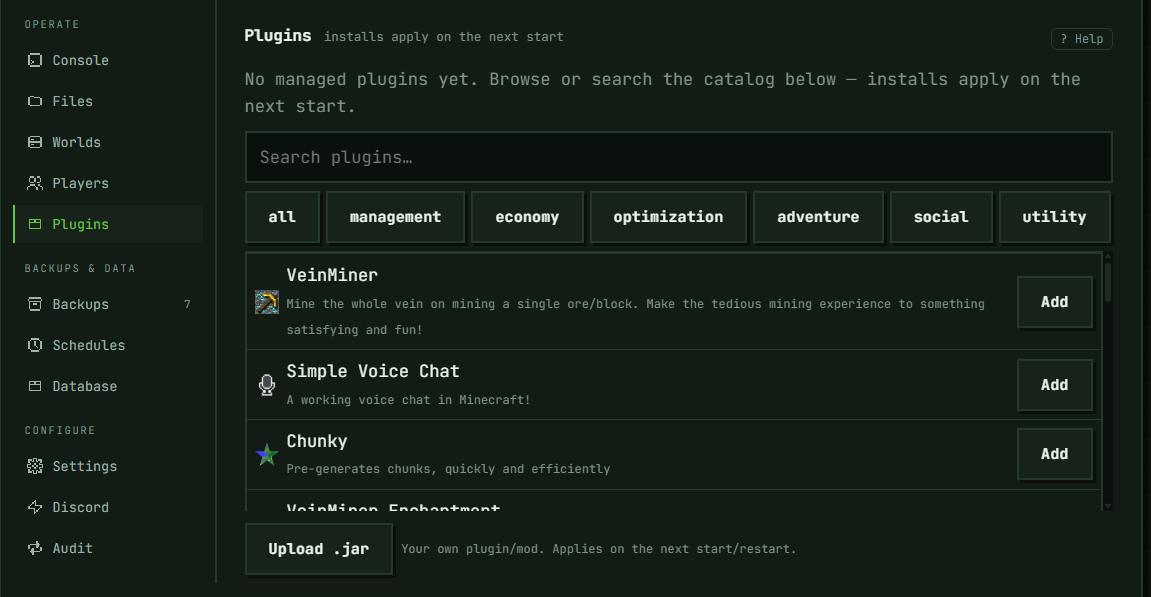
This section doesn't exist for Vanilla servers — Vanilla doesn't run plugins or mods, so the tab is hidden entirely (it's also hidden briefly while a server is still installing). Everywhere else, it's labeled Plugins on Paper and Purpur cores, and Mods on every other core regardless of what that core actually loads — same section, just a different label.
Searching and installing from the catalog
Type into the search box to search the catalog — Modrinth by default; some deployments also offer CurseForge, shown as a switcher above the search box when available. Search kicks in at two characters and always runs, whatever your core or the selected platform. Results are filtered to what your core can actually load only on Modrinth, and only for Paper, Purpur, Forge, NeoForge, and Fabric; everywhere else — including a Fabric server searching CurseForge, which only narrows by plugins-vs-mods rather than by loader — results aren't scoped to your core, so check compatibility yourself before installing. On Forge, NeoForge, and Fabric, Modrinth results also leave out mods Modrinth marks as client-side only — they run in each player's own game, not on a server. On a Paper, Purpur, Forge, NeoForge, or Fabric server searching Modrinth, category chips (management, economy, optimization, adventure, social, utility) let you browse without typing anything. If a search comes back degraded — the catalog's own search is down — the panel says so and falls back to an exact-name match instead of full results.
An item already installed on your server shows Installed instead of Add. Clicking Add installs it unpinned. For a Modrinth install specifically, that means the latest release compatible with your server is what actually gets installed each time the server starts, not a version frozen at install time.
Choosing the version a catalog install stays on
Each catalog install in the list has a Version button. It lists the builds published for your server's loader and Minecraft version — betas and alphas included, each labelled as such, newest first. Pick one and Save: that exact build is installed on every start until you change it here. Latest release (not pinned) (on CurseForge, Not pinned) puts it back to unpinned; on Modrinth it isn't offered when none of the builds for your server is a release. This is also the way to run a beta that fixes a bug the latest release still has. A pinned entry shows which build it's pinned to — the version number (on CurseForge, the file's name) when the panel recorded one, the build's ID otherwise.
A pin stays put when the server's core or Minecraft version changes. If the pinned build isn't published for the new ones, the entry is marked with a warning: it's still installed exactly as pinned, but it may not start — use Version to pick a build made for your server's current core and version.
If a project has only pre-release builds for your server, Add can't install it unpinned — there's no release to install — so it says so and shows the same version list right there.
On CurseForge, a project can have more files for one Minecraft version than the list reads; when that happens the list says so and shows the newest ones. The list needs your server to be on a specific Minecraft version: on LATEST or SNAPSHOT it isn't available.
Some projects need others to run — Chunky on Fabric needs Fabric API. When you add one from Modrinth, Add puts what it needs on the list too, each as its own entry, skipping anything the server already has: an entry on the list, or a jar in its plugins or mods folder whose file name identifies it — one of the project's own file names, or its Modrinth short name (the one in its page's URL) followed by a version number, like Chunky-Bukkit-1.4.40.jar (a renamed jar isn't recognized, and a jar left over from a Modrinth entry you removed doesn't count — the next start deletes it). On Paper and Purpur, FastAsyncWorldEdit counts as WorldEdit. The Audit tab records each one as added as a dependency of the project that brought it in. If one of them can't be installed on your server, nothing is added and the message names it. On a server set up from a modpack whose install failed, Add refuses a project that needs one not already on the list until Retry install gets the pack installed: until the pack's files are in place, there's no telling whether the pack already includes what the project needs. Two cases still add the project alone: CurseForge adds, and servers whose version is LATEST or SNAPSHOT, or not set at all (there's no version to check the dependencies against).
On a Velocity proxy, Add is refused — nothing installs catalog entries on a proxy — so use Upload .jar for proxy plugins.
Uploading your own .jar
Upload .jar is hidden on Vanilla and on any server set up from a modpack (a modpack's manifest already controls its jar list) — everywhere else the button shows. What actually accepts a jar underneath is narrower than that: only Paper, Purpur, Fabric, Forge, NeoForge, and Velocity servers can. On other cores, the button can still appear, but the upload fails with "this server type can't load plugins or mods". That's this platform's own restriction, not a statement about what the core supports: uploaded jars are currently only accepted for those six core types. The upload has to be a real .jar/zip archive, and is capped at 100 MB. An uploaded jar is yours — it doesn't change on its own the way a catalog install can; updating it means removing the old one and uploading the new file.
Removing an install
Remove uninstalls the plugin or mod, but keeps its config files on the server — so reinstalling it later (or upgrading it) doesn't lose whatever it was configured to do.
When changes actually apply
Installs, removals, and uploads all apply the next time the server starts or restarts — never immediately, and there's no separate "apply now" step. If you just changed something and nothing looks different, that's expected until the next start.
Troubleshooting
Don't see this section at all. Either the server is Vanilla (plugins/mods aren't supported there) or it's still finishing installation.
Don't see Upload .jar. Same two cases as above, plus: the server was created from a modpack, whose jar list is managed by the modpack instead.
Upload .jar is there, but every upload fails with "this server type can't load plugins or mods". See "Uploading your own .jar" above — the button's visibility is broader than what this platform actually accepts.
Search or Add fails. If the panel can offer an alternative — the other catalog platform, or uploading the jar directly — it says so under the error. Otherwise retry; a catalog outage on the upstream side is possible and not something a retry on our end fixes.
Installed something and the server behaves the same as before. Restart it — installs only take effect on the next start, not the moment you click Add.
In the panel: Server → Operate → Plugins (Paper/Purpur) or Mods (other cores)