Manage server files
The Files tab is a browser-based file manager for your server's data directory — the same files an SFTP client would see. Nothing here requires the server to be stopped; edits, uploads and deletes all work while it's running (the panel just warns you a live server may be writing into a folder you're about to touch).
Browsing
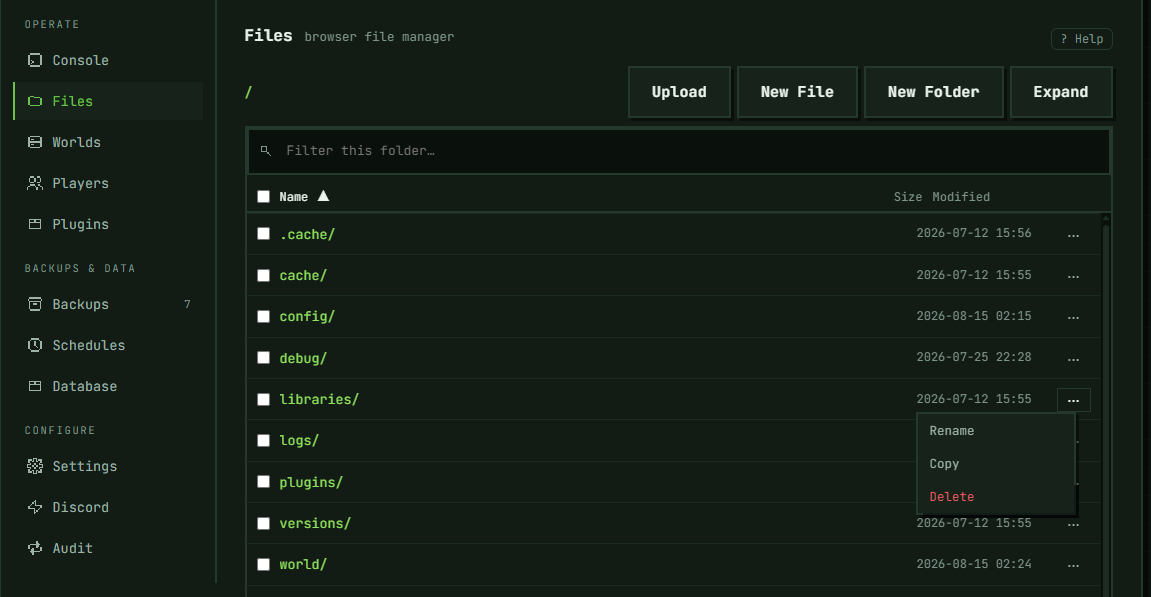
Breadcrumbs at the top track where you are; click a folder to open it, or a breadcrumb segment to jump back up. The search box filters the current folder only — it doesn't search subfolders. Click a column header to sort by name, size, or modified date. Expand switches to a full-window view and adds a folder tree down the left side — folders only, loaded lazily as you open each one — so you can jump straight to a folder anywhere in the data directory instead of stepping through breadcrumbs one level at a time; the list takes the rest of the row, and the editor gets its own column once a file is open.
Creating and editing files
New File creates an empty file and opens it directly in the built-in editor below the list; New Folder creates an empty folder. Both ask for a name through a dialog — that name can't contain /, \, line breaks, or tabs, so a pasted multi-line block can't accidentally turn into a directory tree.
Click any file to open it in the editor, make your changes, and click Save. A very large file opens read-only, marked "(too large to edit)". Use a row's ⋯ menu for Rename or Copy (same name dialog, same restriction).
Uploading and downloading
Use the Upload button or drag files onto the list. Whole folders work too — drag a folder in, or use Upload Folder — and the structure comes over as it was: subfolders are created for you as their files arrive. Empty subfolders are the one exception; there's no file to carry them, so they aren't created.
Uploading a name that already exists in the folder asks you to confirm first. For a folder, that question is asked once, about the folder itself — the panel hasn't looked inside the one that's already there, so rather than promise anything about its contents it tells you that files inside with matching names will be replaced. Everything else in the existing folder stays where it is. Decline, and nothing from that folder is sent; the message at the end names what was skipped.
Every file is sent as its own request, one after another, so a folder of a few hundred files takes a few minutes. Past 500 files or 1 GB in one go the panel stops before sending anything and points you at Import world, which takes the whole thing as a single archive instead. Individual files are capped at 512 MB, and the browser doesn't check that one before sending — a larger file starts uploading and the control plane cuts it off once it hits the cap, so there's no benefit to trying anyway; keep files under the limit to begin with.
A file's ⋯ menu also has Download, which streams it straight from the server.
Extracting an uploaded archive
A .zip, .tar.gz, .tgz, or .tar file's ⋯ menu has an extra entry, Extract here — it lays the archive's contents into the folder it's already sitting in, merging with what's there and replacing any file with the same name. This is for a server you're migrating in from somewhere else: you've uploaded your old host's export as one archive, and you want it laid out here without wiping the plugins, configs, or world already on this server the way Import world would (Import replaces all of /data; this doesn't touch anything the archive itself doesn't bring).
Confirming asks you once, and says only the one thing the panel can state for certain — files with the same names in this folder will be replaced — nothing about what's actually inside the archive, because the panel hasn't looked. If the archive packs a single wrapper folder at its top level (say, myserver/), that folder is created here too: extraction lays out the archive exactly as it was packed, it doesn't unwrap a lone top-level folder for you.
The archive itself is left in place afterward — extracting doesn't delete or move it, so you can run it again without uploading a second time if something needs redoing.
The same two ceilings apply as any archive the control plane extracts: 2 GiB decompressed and 200,000 entries. Only one of them is checked before anything is written: a .zip's entry count, which the archive's own index states up front. The others are hit while extraction is already under way — a .tar.gz's or .tar's entries are counted as they come out of the stream, and either format's size ceiling is reached in the middle of writing the file that crosses it. So going over a ceiling doesn't always mean nothing happened; it can leave part of the archive on disk, the same as any other mid-way failure. Split an oversized archive into smaller ones and extract them one at a time. Only one extraction runs per account at a time — starting a second while one is still running is refused until the first finishes.
Extraction writes files as it goes, with no rollback. If it fails partway through — a ceiling or your disk quota is reached mid-write, or the connection to the node drops — whatever had already been written stays on disk. When the node is still reachable to answer, the message names how much: files, folders, and bytes. When it isn't, or the request was cancelled or timed out on the way, there are no numbers to give you and the folder itself is the only record of what landed.
Deleting
Delete works two ways: a single row's ⋯ menu, or a bulk selection made with checkboxes (including across a filtered view). Deleting a folder first measures what's inside and shows the count and size in the confirmation — or says plainly that it couldn't measure it, if the walk failed or was too large to finish.
Typed confirmation replaces the plain click-through whenever any of these apply, since these are the cases whose loss can end the server rather than just remove a file:
- more than 1,000 files — that folder's own count for a single-row delete, or the combined count across the whole selection for a bulk delete, so several folders each under the threshold can still trip it together
- it (or, in a bulk selection, any part of it) couldn't be fully measured
- it's a protected folder:
world,world_nether,world_the_end,plugins,mods,config,configs, or your active world's own folder name and its_nether/_the_endcompanions if it isn't namedworld
What you're asked to type depends on which path triggered it. Deleting a folder from its own ⋯ menu always asks for that folder's exact name when the gate fires, regardless of what else is checked elsewhere in the list. Deleting via a bulk (checkbox) selection asks for the name only when that one folder is the entire selection; any other selection that trips the gate — several folders together, or a protected folder checked alongside even a single file — asks for the literal word "delete" instead. None of this is reversible.
SFTP access
For anything bigger than the browser is built for — bulk transfers, files over the 512 MB upload cap, or a workflow you already run through a desktop client — enable SFTP under Settings → SFTP access. Turning it on gives you a host, port, username, and password; the password is shown once, so save it immediately. Rotate password issues a new one and invalidates the old one instantly; disabling SFTP does the same. Use any standard SFTP client (FileZilla, WinSCP) to connect.
Troubleshooting
Upload rejected for size. Anything over 512 MB gets rejected by the control plane partway through the upload — there's no browser-side warning beforehand. For anything larger, use SFTP instead.
Can't create a file or folder with the name I want. Names can't contain /, \, line breaks, or tabs — that guard exists specifically because a name field is not a place to paste multi-line content.
Delete asks me to type something before it'll proceed. That's expected for a large, unmeasured, or protected folder (the world and its _nether/_the_end companions, or a plugins/mods/config/configs folder). From a row's own ⋯ menu it always asks for that folder's exact name. From a bulk (checkbox) selection it asks for the name only when that folder is the entire selection — anything else alongside it, another folder or even just one file, gets the literal word "delete" instead. Either way, it's the deliberate extra step before an unrecoverable delete.
No "Extract here" on my file. It only shows up for .zip, .tar.gz, .tgz, and .tar files — rename the upload to end in one of those if your host exported it under a different extension. The name only decides whether the menu entry appears: the archive itself is recognised by its contents, so a .tar.gz that is really an uncompressed tar (a download from another host can arrive that way) still extracts.
Extraction was rejected. The message names the reason — the archive is corrupt or has something we can't extract (like a symlink), it decompresses past 2 GiB or has more than 200,000 entries, it needs a folder where this server already has a file of that name, it wouldn't fit in your remaining disk quota, another extraction is already running, or the node is temporarily unavailable. Split an oversized archive into smaller ones and extract them one at a time; for a name that's already taken by a file, rename or delete that file first; for everything else, wait a moment and retry.
Extraction failed partway through. This design writes files in place as it goes, with no rollback. Whenever the node can still report them, the message tells you how many files, folders, and bytes were already written before the failure; a request that dropped or timed out on the way back comes with no numbers at all. Nothing is undone automatically either way — open the folder, check what's there, and clean up or retry as needed.
Lost the SFTP password. It can't be recovered — it's shown once, at creation or rotation. Click Rotate password to get a new one.
In the panel: Server → Operate → Files